Hello There!

Connecting cognitive psychology, systems architecture, and business velocity.

Moje delo

How I built the design system for Slovenia’s largest job platform

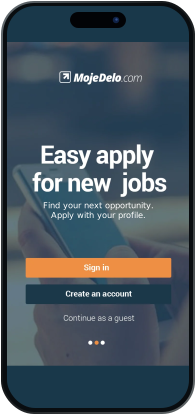
Moje delo welcome screen and sign-in
MojeDelo.com original splash screen
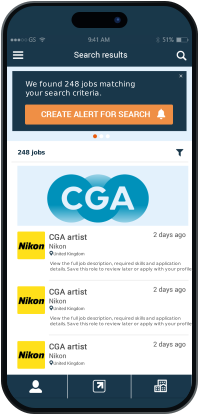
Moje delo job search results
Overview

The design system behind Moje delo, Slovenia’s largest job platform, built by a Slovenian client team and a Serbian team working together.

Project
Moje delo (Styria Digital Marketplaces), via Alterset
My role
All UX and UI, and the design system
Focus
Design system
Teams
Slovenian client team and Serbian team, 8 people
Duration
7 months, with a pause
Platforms
iOS, Android and web
01 / HOOK & CONTEXT

Job hunting is stressful. The interface should not add to it

Moje delo is the largest job platform in Slovenia, in practice the Slovenian LinkedIn, and it is built for the whole working population, not for one age group or profession. Looking for a job is rarely routine. It is stressful, and when people are anxious, one unclear button or one action without confirmation is enough to make them give up.

When I started, the picture was fragmented: desktop habits squeezed into mobile screens, components that behaved differently on Android and iOS, and developers rebuilding the same patterns every sprint. The UX we were given did not solve that, so I took over the UX too and built the design system on top of it. This page is about the system and how I worked on it.

02 / PROBLEM & BOUNDARIES

What we were solving, and what was mine

Business Goal: Ship features faster and cut maintenance work for two teams in two countries.

User Goal: Let candidates spot a relevant role within about 3 seconds of scanning, and apply without losing their place.

My Boundaries: I owned the UX, the UI and the design system: its architecture, token hierarchy, component states and interaction behavior. The developers owned the API and the data, and the client owned the commercial employer packages.

03 / DESIGN PHILOSOPHY

Cognitive psychology over decorative aesthetics

A design system that only standardizes colors is not enough, because people have limits too: attention, memory, stress. I based the interaction rules on cognitive psychology and turned each idea into a concrete UI rule:

01 / Affordances & Explicit Signifiers

A stressed candidate should not have to guess what can be tapped. Orange means the main action, a chevron means a row opens another screen, the selected tab is underlined, and YES/NO switches show their state. Corners are sharp and nothing has shadows, so color and position do the work.

02 / Gulf of Execution & Evaluation

The gap between wanting to apply and being done is where older job portals lose people. Our apply step says exactly what is being sent (a saved CV, a cover letter or an uploaded file) before the final “Apply now”. Afterwards the Applied tab keeps a record of every application, and a native alert warns you if you already applied to that job.

03 / Knowledge in the World vs. in the Head

People look at dozens of jobs in one sitting and cannot remember which ones they saved or applied to. So the dashboard always shows the Recommended, Saved and Applied counts, every job card shows date, employer and location, and recent searches are grouped by day.

04 / Constraints & Error Prevention

Errors appear next to the field, in orange with a ✕, instead of in red banners. Registration shows a progress strip, logging out asks for confirmation, and expired ads are disabled and can only be removed.

04 / SYSTEM ARCHITECTURE

The token model: primitives, roles and components

Both teams needed one shared vocabulary, so I turned the interface into a layered token set in Figma, with every value read from the live screens:

Global / Reference

The raw values: navy #1B374A, orange #EE8F44, light blue #E3F1FD, a few grays, a spacing scale from 2 to 48 pt and corner radii of 0, 2, 14 and 24 pt plus a round one. Nothing outside this set appears in the screens.

Semantic / System

Roles that say what a color is for: bg/canvas, bg/bar, action/primary, text/title, feedback/error. Moje delo has one light theme and never had a dark mode. The contrast problem is documented: white on the brand orange is only 2.43:1, so accessible alternatives are listed as recommendations, apart from what shipped.

Components

Twenty-three master components (buttons, job card, tabs, top bar, fields, list rows, banner, empty state and more) use only role tokens, so no raw color value is left in the library.

05 / SYSTEM BLUEPRINT

A design system built for shared decisions

I wrote the principles down as practical guidance for design and development. These four boards connect the foundations, component behavior, product flows and developer handoff. Click any board to open it.

Design system

Slovenian & Serbian team

A shared interface language for Moje delo.

  • Typography
  • Color
  • Navigation
  • Interface patterns
Typography
Roboto

abcdefghijklmnopqrstuvwxyz

0123456789

Noto Sans

abcdefghijklmnopqrstuvwxyz

0123456789

The app uses both Roboto and Noto Sans, so both are shown here.

01 / Foundations & Token Architecture Semantic color mapping, a contrast audit, and recommended fixes kept separate from what shipped.
02 / Component States & Geometry Specifications for every component, taken from the Figma masters, with only the states that actually shipped.
03 / Product Flows & Behavioral Loops Screens grouped into flows and mapped to the components they use.
04 / Token Architecture & Handoff Token export as JSON, CSS, Android and iOS code, read from the Figma variables.
06 / CRAFT & COMPONENT DEEP-DIVES

Reducing cognitive effort at critical moments

A closer look at the most important component, the Job Card, and how those principles decided its visual hierarchy.

The same job card in two contexts: the Saved list (left) and search results (right).
COMPONENT ANATOMY

The Job Card: readable at a glance

The job card is the basic building block of the platform. I designed its hierarchy so a candidate can answer one question at a glance: "Is this right for me, and can I act now?"

  • 01 / Logo & Title Hierarchy The employer logo sits on the left and the job title is the strongest line on the card, so the role reads first.
  • 02 / Predictable Metadata Stack Date, employer and location always sit in the same rows, each with an icon (calendar, briefcase, pin), so cards are easy to compare. A graduation-cap icon marks ads suitable for students.
  • 03 / Honest Time Pressure “5 days left” counts down to the real deadline. Expired ads are grayed out, labeled “Oglas je potekel” and can only be deleted. Urgency is shown only when it is true.
  • 04 / Contextual Action Layer The orange APPLY NOW chip is on the featured card, and the job detail screen offers “Apply for job” next to “Job saved”.

Context-preserving search & filtering

Each filter shows its current value (“All workfields”, “3 selected”) and the picker marks choices with checkmarks. Company search narrows the list as you type, and the results screen opens with a banner saying how many jobs match, so it is always clear what is applied.

Applying: save, apply, and clear feedback

Job detail ends with a fixed bar: “Job saved” and the orange “Apply for job”. The screen shows the hourly rate and working time, how many days are left to apply, and if you have already applied, a native alert says so instead of allowing a duplicate. The rate is shown per hour because pay depends on the type of work; student jobs, for example, are not taxed up to a certain age.
07 / PROCESS & DECISIONS

How I worked, and the decisions behind the system

A design system is mostly solitary work: you build it on your own, then test it with the team. These are the decisions that shaped it.

When the plan changed

I started with the design system, but the UX we received was not working. A system built on top of it would have polished the wrong thing, so I paused the system, redid the UX and then went back to it. That pause is part of why the project took seven months.

Platform decisions

Dropped: one UI shell for iOS and Android. Each platform keeps its own conventions: native iOS alerts, keyboard and status bar on iOS, Material patterns on Android.

Boundary: the library covers only what is custom to Moje delo. Native elements are documented, not redrawn.

Contrast, honestly

Problem: white text on the brand orange is only 2.43:1, so the primary button fails WCAG AA.

Decision: I documented it as shipped instead of quietly changing the brand, kept accessible alternatives as clearly labeled recommendations, and show deadlines on job cards only when they are real.

What changed with the system

Before, the interface lived in exported screens and PSD files. Now it is a Figma library of variables, 23 components and a token export that both teams can share.

08 / RESULTS

What the numbers said

We measured the effect with Alterset:

40% faster tasks

Improvement in the time candidates need to finish a task across search, filtering and applying.

25% faster handoff

Less time from design to implementation, because tokens and component rules were agreed up front.

Zero raw values

All 23 master components use role tokens, and no raw color value is left in the library.

How we measured it

All figures come from Alterset. We also checked that faster completion did not cost anything elsewhere: support tickets and complaints about accidental submissions did not go up.

09 / RETROSPECTIVE

What I took from it

The part of a design system that lasts is not the Figma library. It is the agreement around it: what each component is for, which states it has, and which trade-offs we accepted.

When controls say clearly what they do and the design itself prevents errors, the product feels trustworthy, and that matters when someone is looking for work.

What I would do differently: add automatic token checks to pull requests from day one, instead of comparing Figma with code by hand in the first sprints.

10 / FREQUENTLY ASKED QUESTIONS

Questions people ask about this project

Short answers, with where to find the evidence on this page.

Topic Question & answer Where to look
Scope Did you inherit this or start it? I started it. After auditing how fragmented the platforms were, I built the system architecture myself, and when the UX we received did not work, I redid the UX as well. Sections 01 and 02, and the Overview above.
Scope How many people were involved, and what was yours? Eight people in two teams: the client side with their PM, and our operational team with our PM and the developers. I was responsible for all the UX and UI and for the design system. The Overview above and Section 02.
Strategy Why this problem and not a feature? Developers kept rebuilding components that had drifted apart, and the UX did not hold up for candidates. The results in Section 08.
Research Where did the approach come from? From cognitive psychology, applied through cognitive walkthroughs, comparative benchmarking and a token audit. Sections 03 and 04.
Decisions How did you handle platform trade-offs? By following each platform’s own conventions (Apple’s and Material) instead of forcing one cross-platform clone. Sections 05 and 07.
Decisions How did the teams adopt the system? I built it on my own first and then tested it with both teams. Section 07.
Results Did it work, and how do you know? Yes. Alterset measured 40% faster task completion and a 25% shorter handoff from design to engineering. Section 08.
Integrity How do you handle what did not meet the standard? I documented that the shipped primary button fails WCAG AA instead of hiding it, and kept accessible fixes separate from what shipped. Sections 04 and 07.
Mistakes What did not work as planned? The first UX we received did not work, which paused the project. The white-on-orange primary button reaches only 2.43:1 contrast, and tabs and chips are smaller than common touch-target guidelines. Sections 04 and 07, and the Foundations board in Section 05.